> ## Documentation Index
> Fetch the complete documentation index at: https://docs.masivo.ai/llms.txt
> Use this file to discover all available pages before exploring further.
# Register a customer
> Learn how to register a customer using Masivo's REST API
Check the complete list of parameters and responses of the [`GET
customers`](/api-reference/customers/\[id]/get) endpoint to get customer data,
and the the [`POST customer`](/api-reference/customers/post) endpoint to
register a new customer.
```typescript theme={null}
const newCustomer = {
id: "unique-customer-id",
name: "John Doe",
email: "john.doe@example.com",
// Optional values
gender: "MALE",
dob: "2003-11-07T05:31:56Z",
metadata: {
/* your additional info */
}
};
const response = await fetch("https://api.masivo.ai/customers", {
method: "POST",
headers: { Authorization: `Bearer ${accessToken}` },
body: JSON.stringify(newCustomer)
});
```
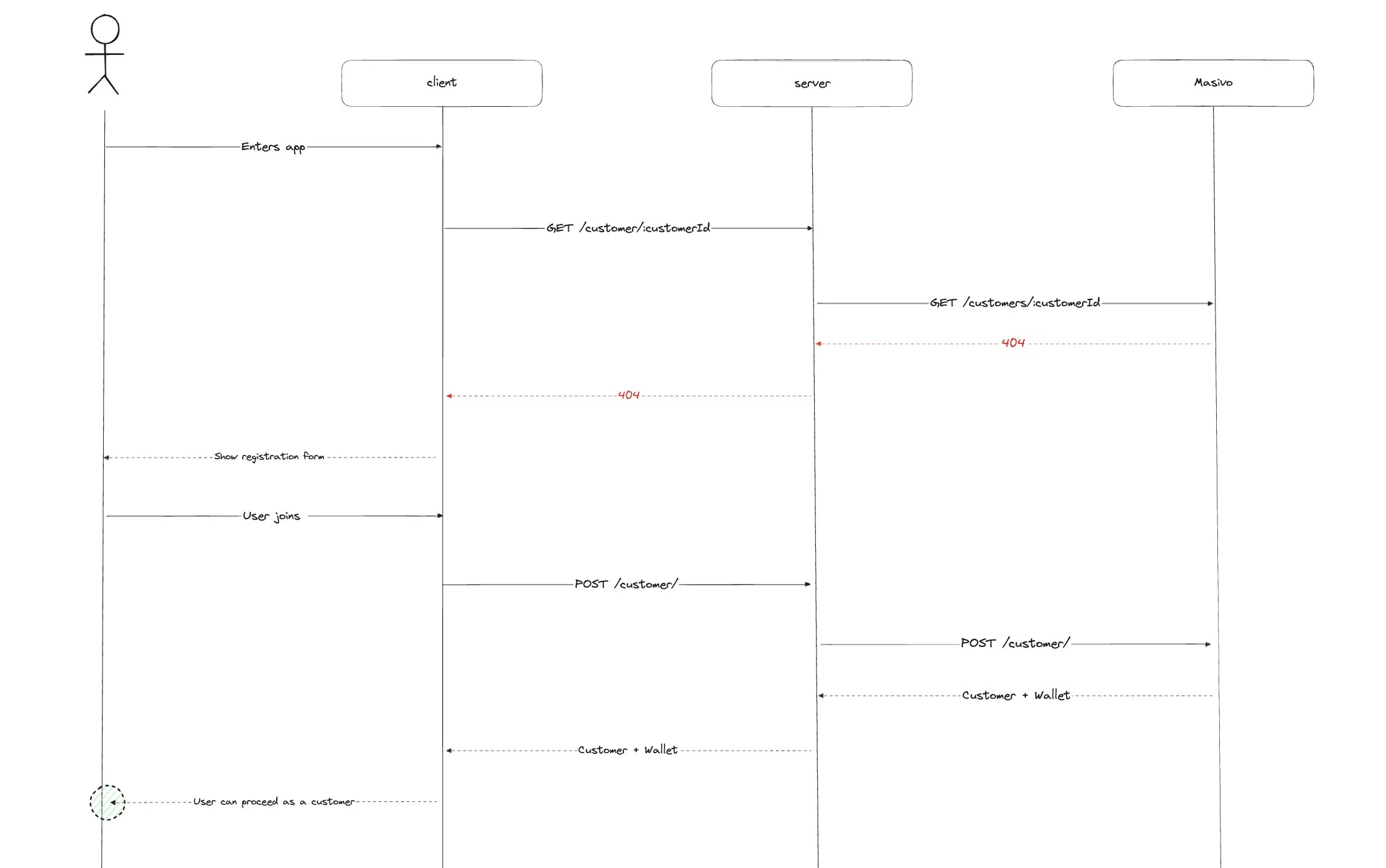
### Check for Existing Customers
Before registering a new customer, it’s often helpful to check whether they already exist in the database. To do this, you can make a GET request to the "/customers" endpoint.
You might be asking, *"How can I check the 'customers' endpoint if I don’t have the `customerId` yet?"* That’s where your service’s customer ID comes into play. When registering a new customer,
you can include your own unique identifier for them. By using that ID, you can call the endpoint to check if the customer is already registered. If they are,
their details will be returned; if not, you’ll receive a 404 response, signaling that it’s safe to proceed with the registration.
### Flow diagram example
 Do not use this guide to migrate customers. Please refer to the [`Migrate
customers`](/api-reference/guides/migrate-customers) guide instead.
## Related architecture
* [Registration flow](/resources/data-architecture#registration-flow) — What Masivo creates after signup: profile, wallet, loyalty event, and sync
Do not use this guide to migrate customers. Please refer to the [`Migrate
customers`](/api-reference/guides/migrate-customers) guide instead.
## Related architecture
* [Registration flow](/resources/data-architecture#registration-flow) — What Masivo creates after signup: profile, wallet, loyalty event, and sync