> ## Documentation Index
> Fetch the complete documentation index at: https://docs.masivo.ai/llms.txt
> Use this file to discover all available pages before exploring further.
# Show customer data
> Learn how to show your customers data using Masivo's REST API
Check the complete list of parameters and responses of the [`GET
customers`](/api-reference/customers/\[id]/get) endpoint to get customer data,
and the [`POST customer`](/api-reference/customers/post) endpoint to
register a new customer.
```typescript theme={null}
const response = await fetch("https://api.masivo.ai/customers", {
method: "GET",
headers: { Authorization: `Bearer ${accessToken}` }
});
```
### Using the customers data
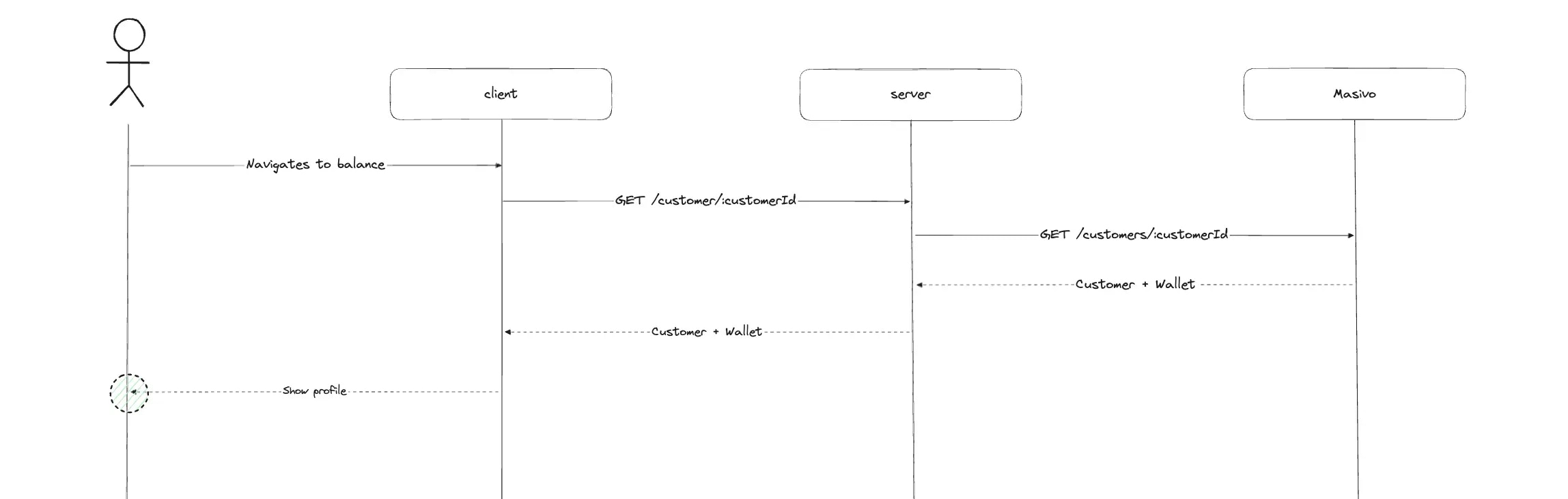
When a customer wants to check their details in *Masivo*, you'll need to integrate a **GET** request to the [`customers endpoint`](/api-reference/customers/\[id]/get). This endpoint retrieves data such as their current tier and wallet balance.
This can be useful in scenarios like displaying a points dashboard, showing tier progression, or presenting reward balances within your ecommerce platform.
### Flow diagram example