> ## Documentation Index
> Fetch the complete documentation index at: https://docs.masivo.ai/llms.txt
> Use this file to discover all available pages before exploring further.
# Create audiences
> Learn how to create and manage dynamic customer audiences in Masivo
Audiences are automatically recalculated to ensure your customer segments stay
current and accurate. You can configure how frequently audiences are
recalculated based on your business needs
## What you'll learn
By the end of this guide, you'll know how to create dynamic customer segments that automatically update based on customer behavior and attributes, enabling you to deliver targeted marketing campaigns and personalized experiences.
## Step 1: Access the audiences section
Navigate to **Marketing Automation > Audiences** in your dashboard. This is your control center for creating and managing customer segments that power your automated marketing campaigns.
Click the **New audience** button to start building your first dynamic customer segment.
## Step 2: Configure your audience foundation
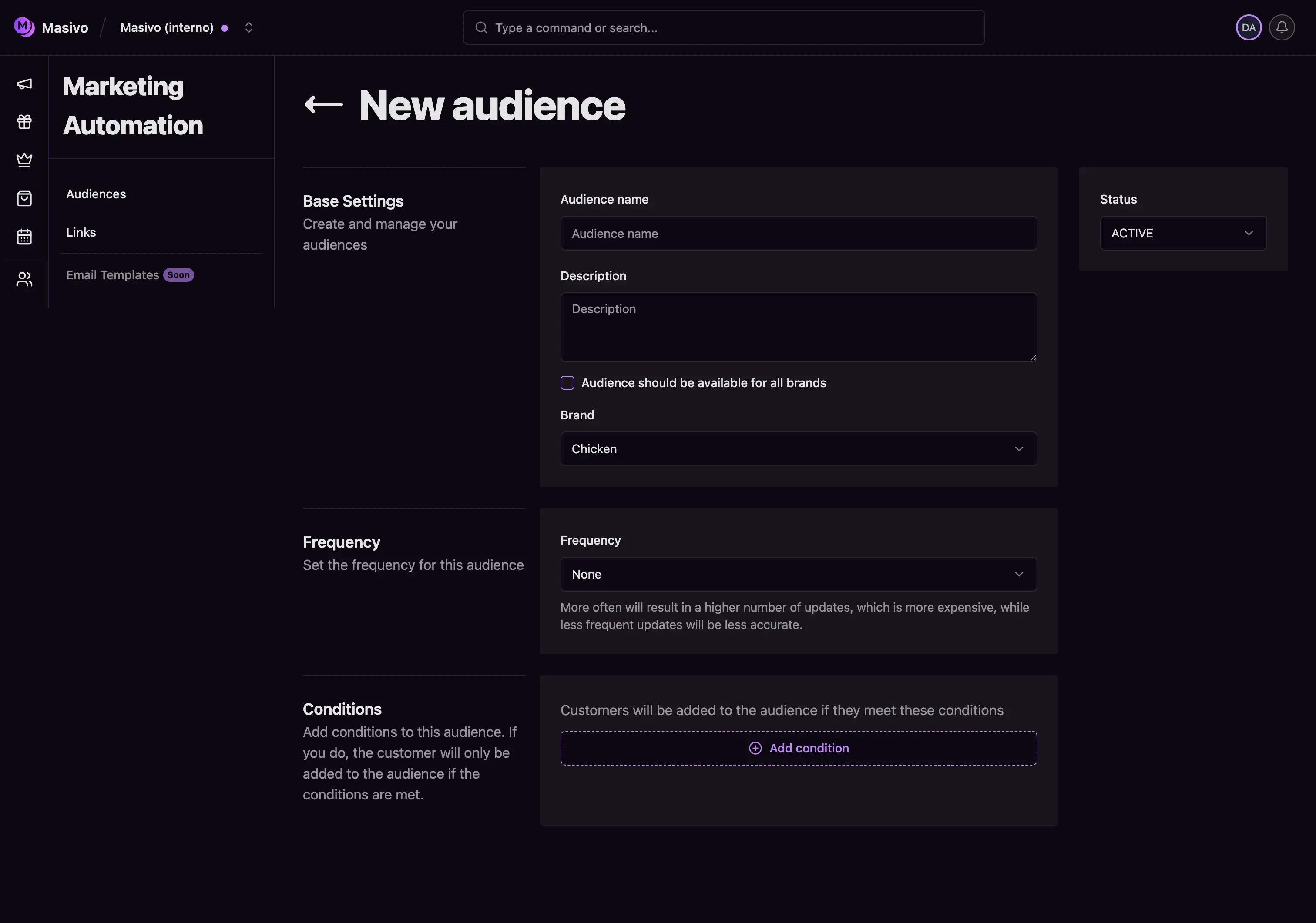 Start by establishing the core settings that will define how your audience operates:
**Choose a descriptive name**: Use specific names like "High-Value Customers" or "Cart Abandoners - 24h" instead of generic ones. This makes audiences easy to identify when building journeys and campaigns.
**Add a helpful description**: Write a brief explanation of the audience's purpose. For example: "Customers who have spent over \$500 in the last 6 months" or "Users who registered but haven't made their first purchase."
**Set brand scope**: Decide whether this audience applies to:
* **All brands**: Choose this for universal segments like "VIP Customers" that span your entire business
* **Specific brand**: Select this when creating brand-specific segments for targeted campaigns
Start with brand-specific audiences for your first segments. They're easier to
manage and create more targeted marketing experiences.
## Step 3: Configure audience frequency
Set how often your audience should recalculate to stay current with customer behavior:
**Choose your update frequency**:
* **Never**: For static, one-time segments that don't need updates
* **Daily**: For audiences based on recent activity (recommended for most use cases)
* **Weekly**: For segments based on weekly patterns or less time-sensitive criteria
* **Monthly**: For audiences based on monthly spending or long-term behavior
* **Quarterly/Yearly**: For segments based on seasonal patterns or annual metrics
More frequent updates provide better accuracy but consume more resources.
Choose the frequency that matches your business needs and campaign timing.
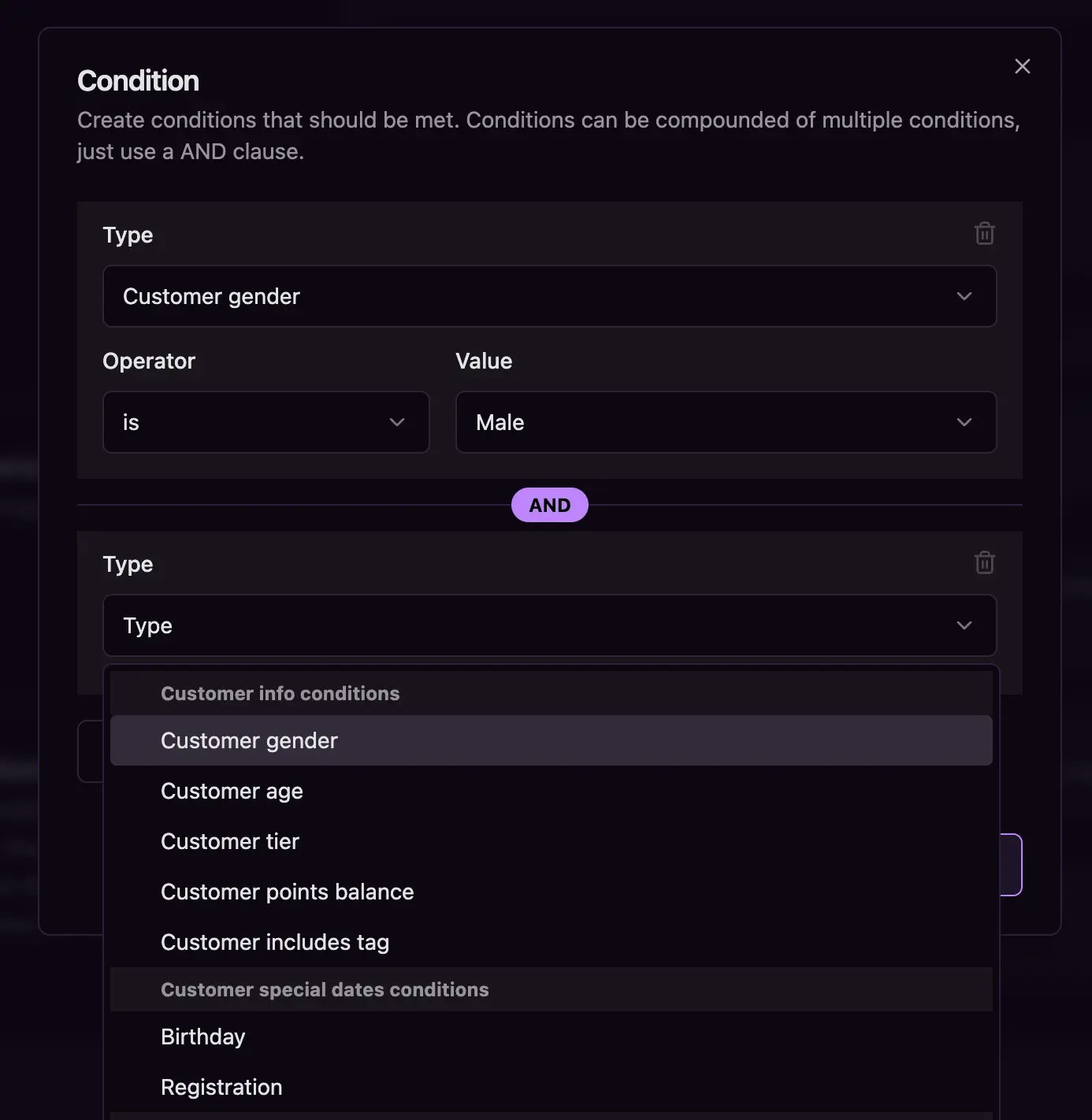
## Step 4: Define audience conditions
This is where you define who belongs in your audience using powerful condition builders
Start by establishing the core settings that will define how your audience operates:
**Choose a descriptive name**: Use specific names like "High-Value Customers" or "Cart Abandoners - 24h" instead of generic ones. This makes audiences easy to identify when building journeys and campaigns.
**Add a helpful description**: Write a brief explanation of the audience's purpose. For example: "Customers who have spent over \$500 in the last 6 months" or "Users who registered but haven't made their first purchase."
**Set brand scope**: Decide whether this audience applies to:
* **All brands**: Choose this for universal segments like "VIP Customers" that span your entire business
* **Specific brand**: Select this when creating brand-specific segments for targeted campaigns
Start with brand-specific audiences for your first segments. They're easier to
manage and create more targeted marketing experiences.
## Step 3: Configure audience frequency
Set how often your audience should recalculate to stay current with customer behavior:
**Choose your update frequency**:
* **Never**: For static, one-time segments that don't need updates
* **Daily**: For audiences based on recent activity (recommended for most use cases)
* **Weekly**: For segments based on weekly patterns or less time-sensitive criteria
* **Monthly**: For audiences based on monthly spending or long-term behavior
* **Quarterly/Yearly**: For segments based on seasonal patterns or annual metrics
More frequent updates provide better accuracy but consume more resources.
Choose the frequency that matches your business needs and campaign timing.
## Step 4: Define audience conditions
This is where you define who belongs in your audience using powerful condition builders
 ## What you've accomplished
You've created a dynamic customer audience that automatically maintains
accurate segments based on real-time customer behavior. Your audience will now
continuously update to ensure your marketing campaigns always target the right
customers at the right time.
## Related architecture
* [Audiences](/resources/data-architecture#audiences) — How membership is built, recalculated, and kept in sync
* [Activity & events](/resources/data-architecture#activity-events) — Where profile traits used in conditions come from
* [Marketing & destinations](/resources/data-architecture#marketing-destinations) — How audiences drive journeys and destination sync
## What you've accomplished
You've created a dynamic customer audience that automatically maintains
accurate segments based on real-time customer behavior. Your audience will now
continuously update to ensure your marketing campaigns always target the right
customers at the right time.
## Related architecture
* [Audiences](/resources/data-architecture#audiences) — How membership is built, recalculated, and kept in sync
* [Activity & events](/resources/data-architecture#activity-events) — Where profile traits used in conditions come from
* [Marketing & destinations](/resources/data-architecture#marketing-destinations) — How audiences drive journeys and destination sync