> ## Documentation Index
> Fetch the complete documentation index at: https://docs.masivo.ai/llms.txt
> Use this file to discover all available pages before exploring further.
# Unsubscribe links
> Understand why including dynamic unsubscribe links is essential for compliance and deliverability
Marketing email must provide a clear opt-out. Transactional account email is
excluded from marketing unsubscribe behavior.
## Overview
Every marketing email must include a way for recipients to opt out. This is a
key part of deliverability and maintaining a healthy audience.
This guide explains why dynamic unsubscribe links are essential, and how they relate to practices like audience hygiene and domain warm-up.
## Why unsubscribe links matter
Failing to include an unsubscribe link can result in:
* Emails marked as spam or phishing
* Poor deliverability rates
* Blacklisted domains or IP addresses
* Provider enforcement or account suspension
Including a proper unsubscribe option builds trust with your recipients and protects your sender reputation.
## How unsubscribe links help during domain warm-up
When warming up your domain or IP, your goal is to establish a strong sender reputation by gradually increasing your volume and avoiding spam complaints.
While unsubscribe links are not explicitly mentioned in warm-up schedules, they play a key role in:
* Keeping user-reported spam low
* Giving users a clear and respectful way to opt out
* Preventing harmful engagement patterns that damage reputation
This aligns with Google's recommendation to keep spam rates below 0.1% and
avoid reaching 0.3% or higher.
## What is a dynamic unsubscribe link?
Masivo supports template variables like `{{unsubscribe_link}}`, which are replaced at send time with a personalized unsubscribe URL for each recipient.
This ensures:
* Users can be safely and uniquely identified
* Unsubscribe requests are properly handled and tracked
* You stay compliant with anti-spam regulations like CAN-SPAM and GDPR
Masivo also adds personalized RFC 8058 headers to marketing email:
* `List-Unsubscribe` contains a signed recipient URL.
* `List-Unsubscribe-Post: List-Unsubscribe=One-Click` allows Gmail and other
supporting inboxes to unsubscribe with a POST request.
The POST is idempotent, so repeated provider requests remain successful without
resubscribing or duplicating state.
Never use a static or shared unsubscribe URL. Always insert ` {{ unsubscribe_link }}` inside your email body to personalize the opt-out link
for each recipient.
## How to configure the unsubscribe link
To properly insert the unsubscribe link in your emails, follow these steps using the Masivo Email Builder.
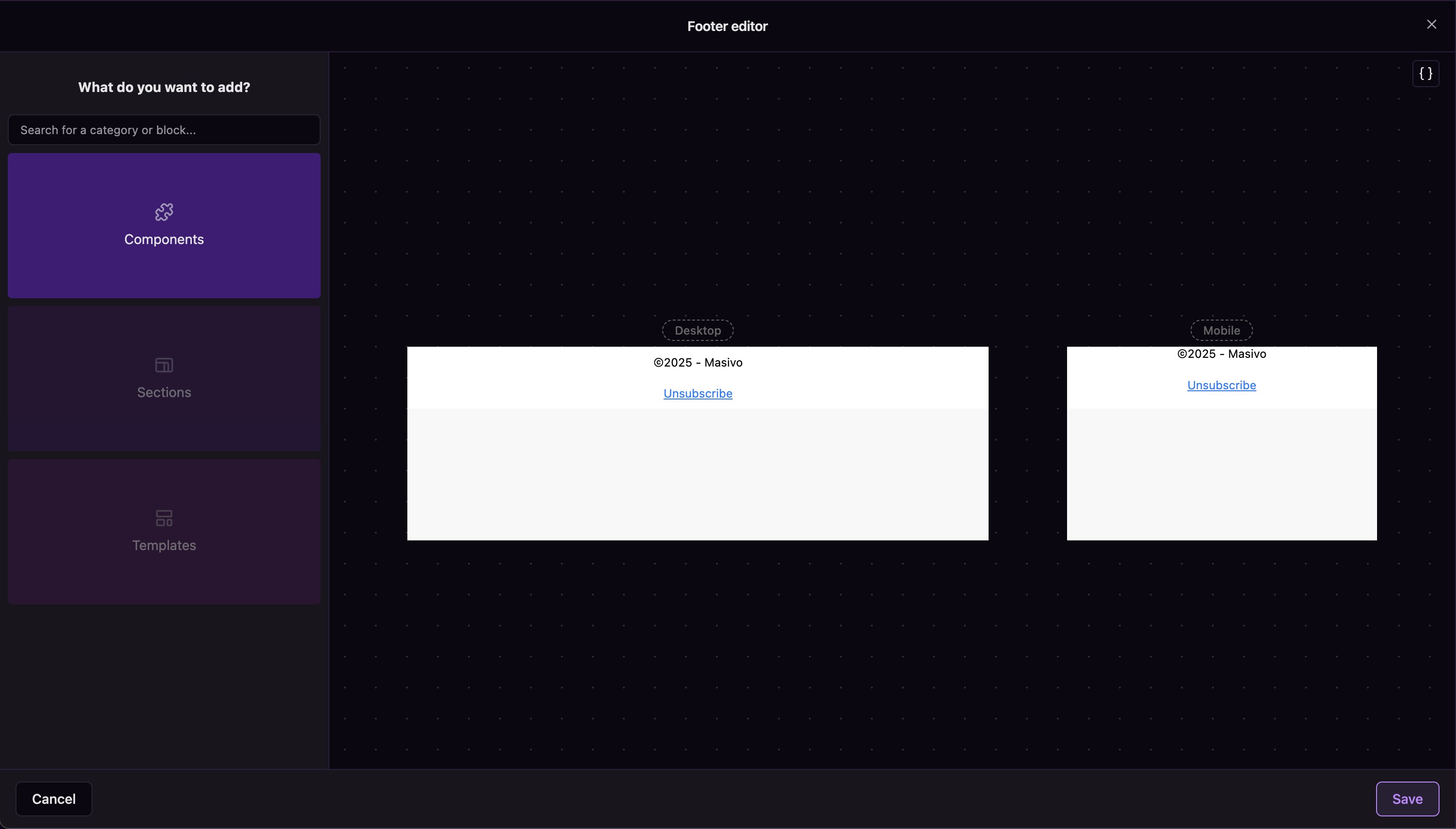
### 1. Add the unsubscribe link to the footer
Use the footer editor to insert a new line with an unsubscribe link in both desktop and mobile versions.
 ### 2. Use the dynamic variable in the snippet
Edit the Unsubscribe component to include the dynamic variable. Make sure the snippet uses the dynamic placeholder:
`{{global.unsubscribe}}`
This ensures that each recipient gets a personalized unsubscribe URL.
### 2. Use the dynamic variable in the snippet
Edit the Unsubscribe component to include the dynamic variable. Make sure the snippet uses the dynamic placeholder:
`{{global.unsubscribe}}`
This ensures that each recipient gets a personalized unsubscribe URL.
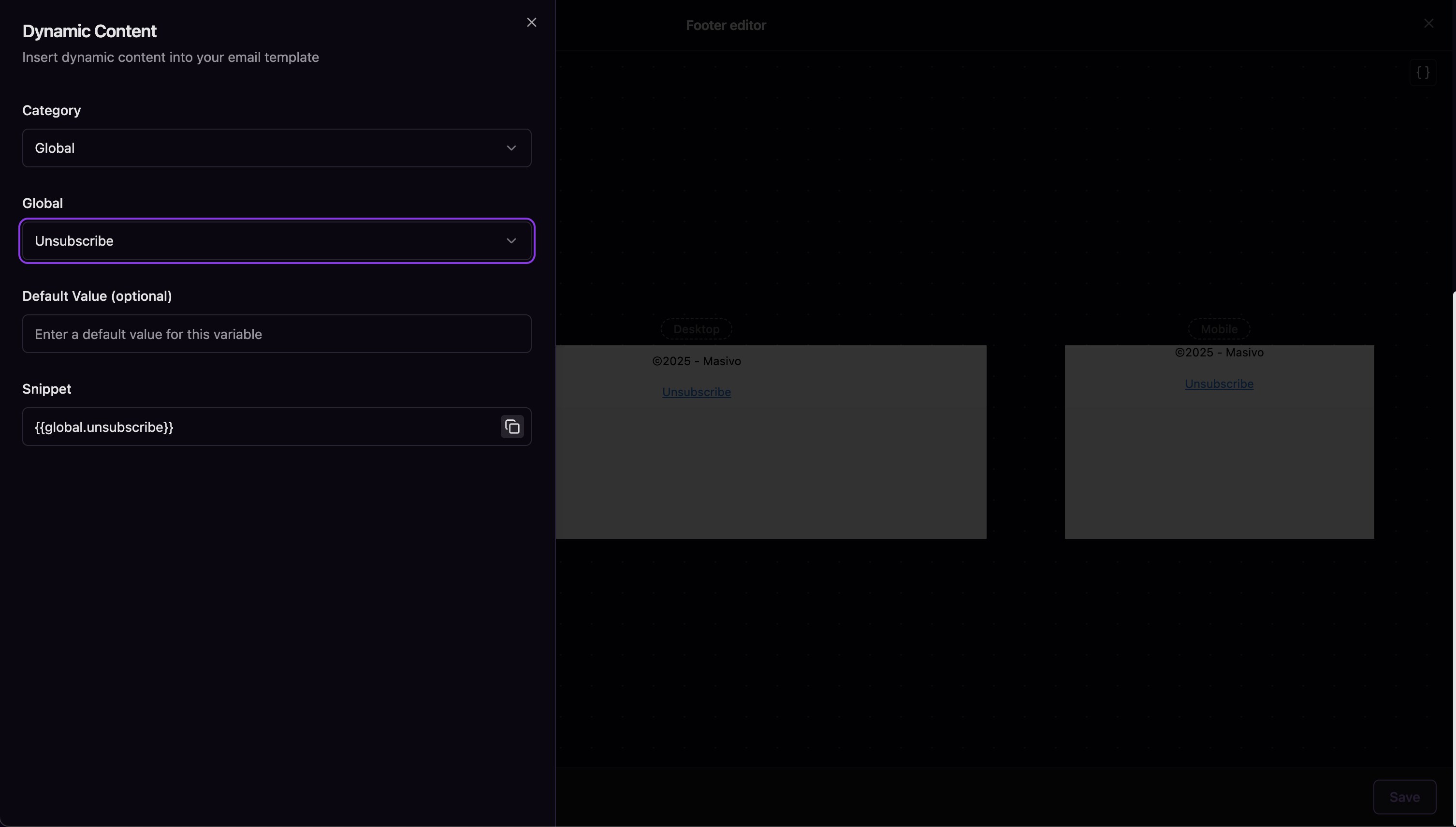 The variable `{{global.unsubscribe}}` must be present in your template for Masivo to track and honor unsubscribe requests correctly.